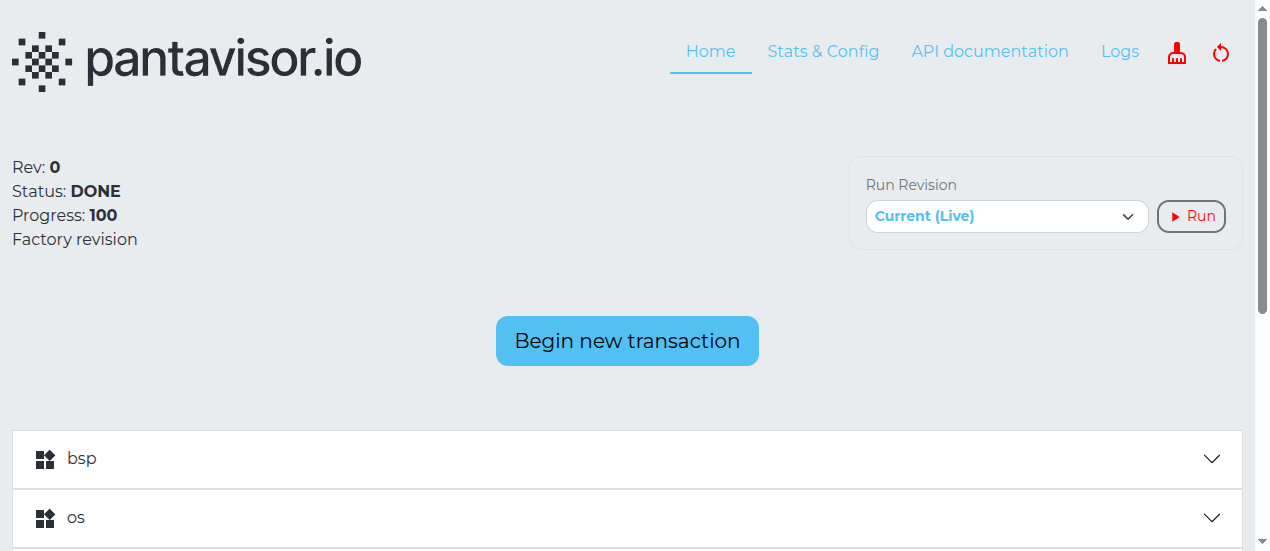
View Installed Applications
You can inspect running containers, their health state, and their logs from the device console, the pvcontrol CLI, or the pvtx local web UI.
Quick Container List
On the device console (serial or SSH), lxc-ls -f shows all containers and their LXC state:
lxc-ls -f
Example output:
NAME            STATE   AUTOSTART GROUPS IPV4 IPV6 UNPRIVILEGED
bsp             RUNNING 0         -      -    -    false
network         RUNNING 0         -      -    -    false
sensor-app      RUNNING 0         -      -    -    false
Full Device Status with pvcontrol
pvcontrol ls shows the Pantavisor view of each container, including auto-recovery counters and group membership:
pvcontrol ls
More targeted sub-commands:
pvcontrol container ls          # containers and their Pantavisor status
pvcontrol daemons ls            # long-running daemon containers
pvcontrol groups ls             # container groups and their restart policy
pvcontrol graph ls              # active pv-xconnect service mesh links
pvcontrol buildinfo             # Pantavisor build and revision info
pvcontrol container stop <name> and pvcontrol container start <name> let you stop or restart individual containers without deploying a new revision — useful during development.
Viewing Logs
Pantavisor writes container console output and LXC logs to the storage partition. On a running device the paths are:
| Log | Path |
|---|---|
| Pantavisor runtime | /run/pantavisor/pv/logs/0/pantavisor/pantavisor.log |
| Container console | /run/pantavisor/pv/logs/0/<container>/lxc/console.log |
| LXC internal log | /run/pantavisor/pv/logs/0/<container>/lxc/lxc.log |
Tail a container's console log in real time:
tail -f /run/pantavisor/pv/logs/0/sensor-app/lxc/console.log
Check the Pantavisor runtime log for OTA update progress or auto-recovery events:
tail -f /run/pantavisor/pv/logs/0/pantavisor/pantavisor.log
Using the pvtx Web UI
The pvtx UI is served directly from the device on port 12368. Open a browser and navigate to:
http://<device-ip>:12368/app
The homepage shows all running containers and the current revision state. You can also view the revision history and initiate configuration transitions from this interface.